Custom Curve – the definitive software for complete control over mouse sensitivity
Custom Curve
Complete Sensitivity
Control
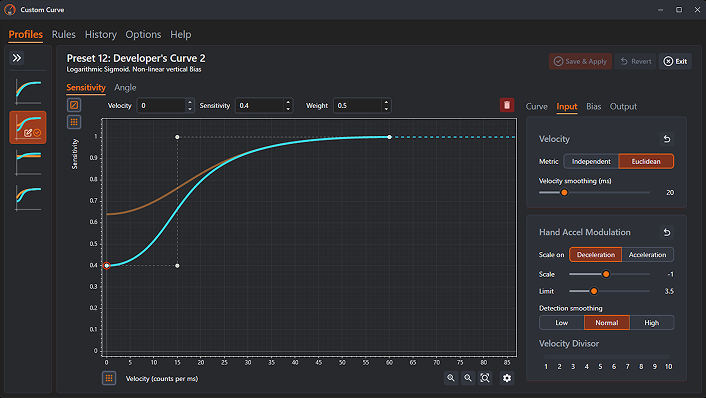
Custom Curve enables you to create a fully personalized mouse acceleration curve that applies system-wide, through an intuitive interface. With extensive customization, it’s the complete mouse sensitivity tool for gaming.
Custom Curve provides complete sensitivity control through an intuitive interface. It provides extensive customization that applies system-wide and keeps your settings in any game or program.
Powerful sensitivity and acceleration tuning lets you combine the advantages of low and high sensitivity. Lower sensitivity enables increased precision, while higher sensitivity allows comfortable navigation. Custom Curve provides complete control over this process so you can create consistent settings customized to your play style.
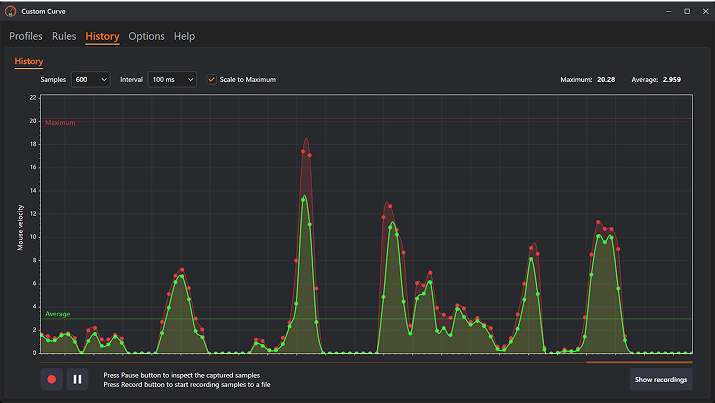
Custom Curve lets you design and fine-tune mouse behavior in real time through a clean, visual interface that works across games and hardware.
Advanced Sensitivity Control
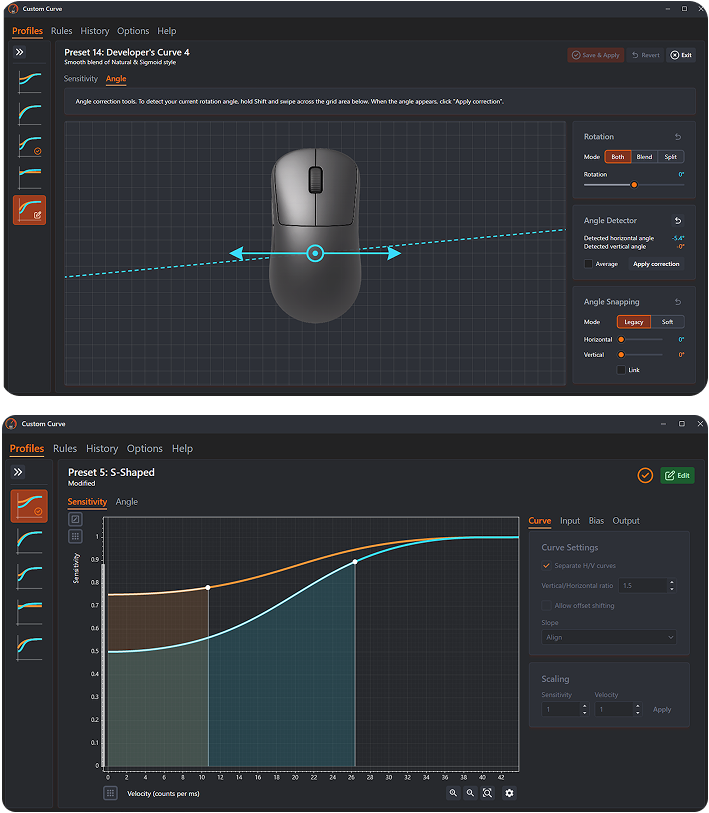
Fine-tune sensitivity with precise control, including independent X and Y axis tuning.
Acceleration Curve Editor
Fine-tune sensitivity with precise control, including independent X and Y axis tuning.
Universal Compatibility
Fine-tune sensitivity with precise control, including independent X and Y axis tuning.
Powerful Yet Simple
Fine-tune sensitivity with precise control, including independent X and Y axis tuning.
Easy To Begin
Choose an expert-designed preset or create your own settings with real-time visual feedback to guide you.
Advanced Sensitivity Control
Enjoy unprecedented control like never before with a variety of proprietary features.
Universal Compatibility
Works with virtually every mouse and game. Use any polling rate or DPI. Unaffected by in-game frame rates or performance.
Powerful Yet Simple
Just click and drag. Feel the improvements. No complex formulas or math.
Advanced Features
Custom Curve includes advanced optional features for both power users and accessibility.
Apply independent horizontal and vertical sensitivities with full control over diagonal angle shift.
Hand Accel Modulation
Allows your mouse hand’s physical acceleration, not just its speed, to initiate additional cursor acceleration or deceleration.
Built For Everyone
Whether you're just playing for fun or pushing competitive limits, Custom Curve adapts to your style.
Whether you're playing casually or competing seriously, Custom Curve gives you the tools to dial in your sensitivity for any style of play
Competitive Gamers
Dial in mouse behavior for competitive play with consistent, controllable movement across scenarios.
Enthusiasts & Tweakers
Explore advanced tuning options, experiment freely, and refine your setup with detailed control.
Players Seeking Control
Understand how your mouse responds to input and make informed adjustments without guesswork.
Competitive Players
Fine-tune every detail and maximize precision to gain a true competitive edge.
Enthusiasts & Tweakers
Unlock advanced controls, experiment freely, and create a setup tailored exactly to you.
Casual Gamers
Play more comfortably, improve accuracy effortlessly, and enjoy longer sessions with less strain.
Changing the Game
The innovations of Custom Curve have redefined how gamers can configure and utilize mouse sensitivity. With more control than ever and an intuitive interface, it makes once complex concepts easy to understand. The benefits of advanced sensitivity tuning are now within reach of any player.
The innovation of Custom Curve has redefined the gaming landscape, changing how gamers configure, and even understand sensitivity. Competitive gamers have more control than ever, and the simple interface makes complex concepts easy to understand and configure, so everyone can benefit.
Anti-Cheat Friendly Design
Custom Curve uses a proprietary, signed driver designed to be anti-cheat friendly and prevent abuse. It is not capable of any input injection / synthesis.
Easy Setup
Getting started with Custom Curve is straightforward. Configure settings system-wide or per game. Use hot keys to swap profiles. Easily enable/disable settings at any time.